


Getting Started with Android Generative AI
Learn how to get started with generative AI in Android. This article explains Gemini models, on-device vs cloud AI, and how to choose the right AI approach for your Android app. By Zahidur Rahman Faisal.
Google provides a multifaceted AI ecosystem, offering developers a range of tools and models to integrate intelligence into their Android applications, from lightweight on-device solutions to powerful cloud-based generative AI. However, finding the right AI or ML solution for your app can be tricky. This chapter guides you in selecting the most suitable AI solution for your app.
To simplify your decision, start by asking yourself one question: What is the primary goal of the AI feature?
- Use Generative AI if you’re generating new content that is fairly simple, such as text or images, or performing simple text processing tasks like summarizing, proofreading or rewriting text.
- Use Traditional ML if you’re analyzing existing data for prediction, or processing real-time streams like video or audio to classify, detect or understand patterns.
Gemini Models: The Foundation of Intelligent Android Experiences
The Gemini family of models forms the backbone of Google’s AI strategy, offering different sizes and capabilities optimized for different use cases. The existence of Gemini Nano, Flash and Pro demonstrates a deliberate strategy to provide a spectrum of AI capabilities: Nano for on-device use, Flash for efficient cloud tasks, and Pro for complex, high-reasoning cloud tasks.
This tiered approach allows Android developers to match the AI model to their application’s specific requirements for computational power, latency, privacy and cost. It also makes AI integration accessible across a wide range of devices and use cases, from simple offline features to more advanced cloud-powered generative experiences.
Gemini Nano
Gemini Nano is optimized for on-device use cases. It enables generative AI experiences without requiring a network connection or sending data to the cloud.
Key features include:
- On-device execution: Runs directly in Android’s AICore system service, leveraging device hardware for low inference latency and keeping models up to date.
- ML Kit GenAI APIs: Provides a high-level interface for common on-device generative AI tasks such as summarization, proofreading, rewriting and image description.
- Google AI Edge SDK: Offers experimental access for developers who want to test and enhance their apps with on-device AI capabilities.
Gemini Nano is ideal for scenarios where low latency, low cost and strong privacy safeguards are especially important.
Example: Suggesting meal ideas based on different cuisines and a user’s meal history in a meal prep app.
Gemini Flash
Gemini Flash is a powerful and efficient workhorse model designed for speed and low cost, making it a strong option for everyday tasks that need quick performance.
Key features include:
- Speed and efficiency: Optimized for quick responses and cost-effectiveness.
- Multimodal capabilities: Natively understands text, audio, images and video, and can generate text output. Newer Gemini models can also generate multimodal outputs such as audio and images.
- Long context window: Supports a 1-million-token context window, allowing exploration of large datasets.
- Adaptive controls: Offers adjustable thinking budgets so developers can balance performance and cost.
Gemini Flash is ideal for summarization, chat applications, data extraction and captioning.
Example: Creating a shopping list of ingredients for a specific cuisine style from a recipe description.
Gemini Pro
Gemini Pro is Google’s most advanced model. It excels at complex prompts, enhanced reasoning and advanced coding tasks.
Key features include:
- Enhanced reasoning: Delivers strong performance in key math and science benchmarks and can reason through problems before responding. It also includes Deep Think for parallel thinking techniques.
- Advanced coding: Can generate code for web development tasks and create interactive simulations, animations and games from simple prompts.
- Multimodal interactions: Natively understands text, audio, images and video.
- Long context window: Supports a 1-million-token context window for working with large datasets.
- Tool integration: Can use tools and function calling during dialogue, allowing real-time information and custom developer-built tools to be incorporated.
Gemini Pro is ideal for multimodal understanding, handling large amounts of information and deep research.
Example: Analyzing hundreds of complex documents, such as contracts, depositions, expert testimonies and transcripts, which may include handwritten text and scanned images at a law firm.
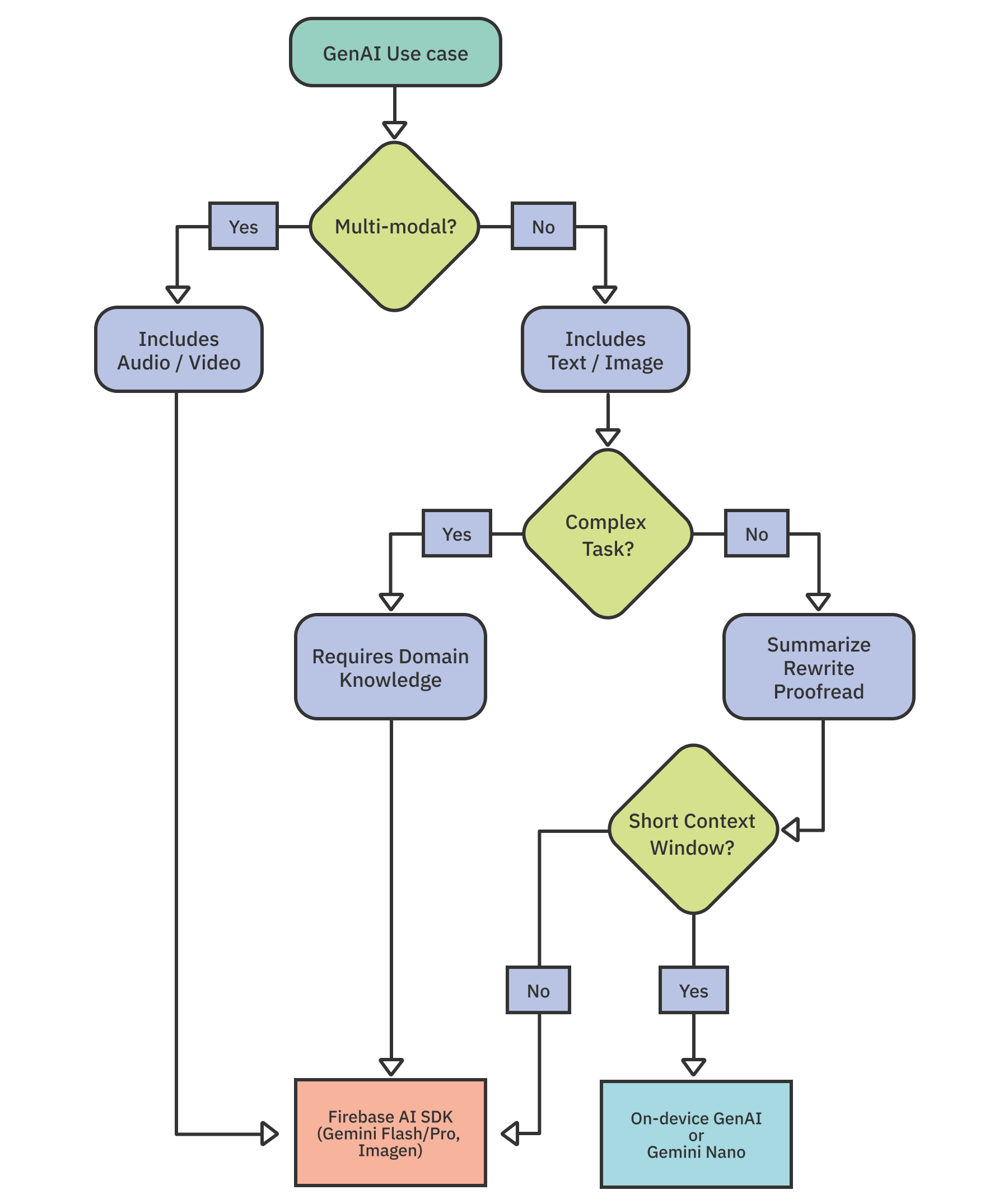
When choosing between these models, consider factors such as the data type involved, the complexity of the task and the size of the input. These factors will help you decide between using Gemini Nano on-device or Firebase’s cloud-based AI options, including Gemini Flash, Gemini Pro and Imagen.
This diagram may enhance your decision making.
Choosing Between On-device vs Cloud-based Approach
When integrating AI or ML features into your Android app, you must decide whether to process data on the device or in the cloud. Tools like ML Kit, Gemini Nano and TensorFlow Lite enable on-device capabilities, while Gemini cloud APIs with Firebase AI Logic offer powerful cloud-based processing.
Factors like connectivity, data privacy, model capabilities, cost, device resources and fine-tuning should guide your decision.
- Offline functionality: On-device solutions like Gemini Nano are ideal when your app needs to function reliably without an internet connection. Cloud-based processing requires network access.
- Data privacy: On-device processing keeps sensitive information local, which is beneficial for privacy-sensitive use cases.
- Task complexity: Cloud-based models are typically larger, more powerful and updated more frequently, making them better suited for complex AI tasks or larger inputs with high output quality. Simpler tasks may be handled by on-device models.
- Cost: Cloud APIs involve usage-based pricing, so costs scale with inferences or data processed. On-device inference avoids API usage charges, but can impact battery life and device performance.
- Device resources: On-device models consume storage space and processing resources. Make sure your target devices can support specific on-device models such as Gemini Nano.
- Customization: Cloud-based solutions generally offer greater flexibility and customization options for fine-tuning.
- Cross-platform support: If you want consistent AI features across platforms such as iOS and Android, cloud-based approaches may be easier. Some on-device solutions, including Gemini Nano, may not be available on all operating systems.
On-device Generative AI
Gemini Nano is the core of Android’s on-device large language model that runs locally without a network connection. It is built into Android’s AICore system service, leveraging device hardware for low-latency inference while keeping user data on-device.
You can access Gemini Nano through the following options:
- ML Kit GenAI APIs: High-level, turn-key APIs for common tasks such as text summarization, chat rewriting, proofreading and image description. These APIs use Gemini Nano under the hood, allowing you to add generative features with minimal code.
- Google AI Edge SDK: A lower-level SDK for developers who need custom prompting and experimentation with Gemini Nano on-device.
Note: At the time of writing, Google AI Edge SDK offers only experimental access. Using Gemini Nano through Google AI Edge SDK requires compatible Android devices and has specific token limits: 1024 prompt tokens and 4096 context tokens.